There's a good chance your geyser has been on since this morning, quietly reheating water nobody's used since your last bath. A smart plug for geyser fixes exactly this - it sits between the geyser and the wall socket and switches the power off on a schedule you set once, so you stop paying to keep water hot for no one.
The Real Reason Your Geyser Bill Feels High
Ask most people how long their geyser actually needs to run, and they'll say twenty minutes, maybe thirty. Ask them how long it's actually switched on, and the answer is usually "since the morning" or "I forget to turn it off, honestly." That gap is the whole problem. Geysers are among the hungriest appliances in an Indian home - often pulling 1500 to 3000 watts and every extra hour they sit switched on for no reason adds straight to your bill. Not because the appliance is inefficient, but because it's doing a job nobody asked it to do.
What a Smart Plug Actually Changes
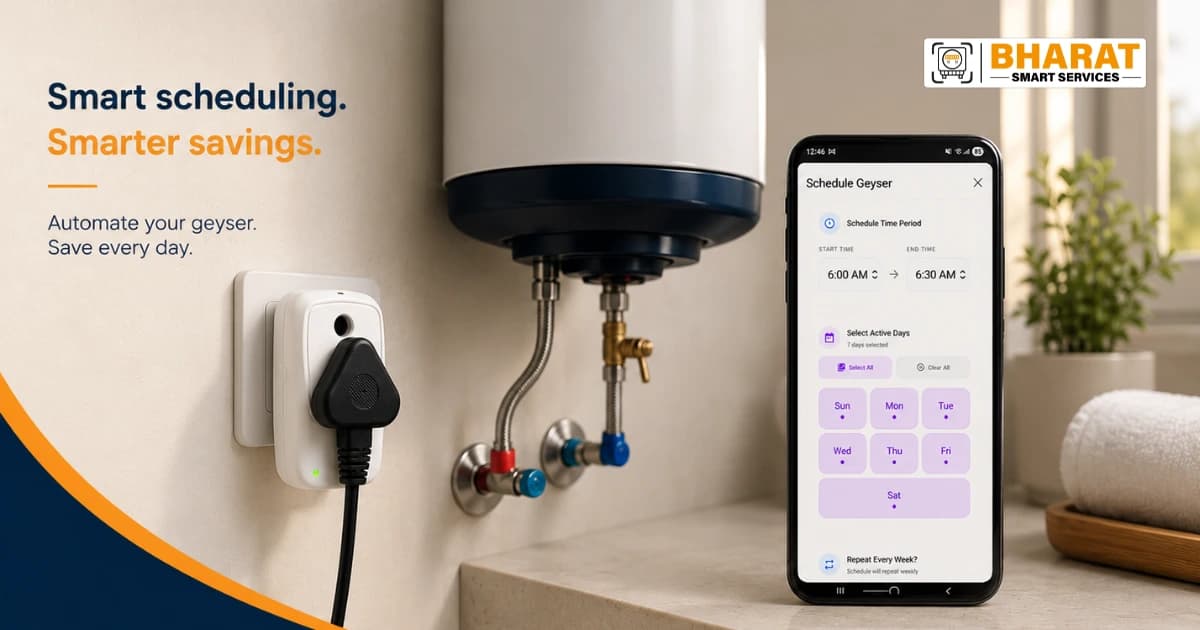
A smart plug doesn't make your geyser more efficient, it makes your switching habits reliable, which is the part most of us are genuinely bad at. Instead of relying on memory, the plug does it for you:
| What it does | Why it matters for a geyser |
| Schedule timers | Set it to switch on 20 minutes before your usual bath time and off right after, it never runs "just in case." |
| Control from anywhere | Left home and can't remember if you switched it off? Turn it off from wherever you are, through the app. |
| Real-time energy monitoring | See exactly how long the geyser ran today, not just a guess at month-end when the bill arrives. |
| Works with Alexa | "Alexa, turn off the geyser" from the couch, instead of walking back to check. |
Geyser Energy Saving Tips Worth Actually Following
Most "energy saving tips" lists read the same everywhere. Here's the version that's actually specific to a geyser, and to what tends to go wrong in practice:
- Stop trusting yourself to switch it off. This is the single biggest saving, and it's also the one people fail at most consistently, which is exactly the gap a timer closes.
- Keep the thermostat around 55–60°C. Anything hotter just gets diluted with cold water at the tap anyway, you're paying to heat water you'll cool right back down.
- Check the exposed pipe between the geyser and the tap. An uninsulated pipe loses heat along the way, which means the geyser runs longer to deliver the same warm water.
- Look at the BEE star rating before you buy your next one. A 4- or 5-star geyser costs a bit more upfront and noticeably less to run, year after year.
- Descale it once in a while. Sediment build-up on the heating element means it works harder for the same result - a five-year-old geyser with scale on the coil is quietly less efficient than the day you bought it.
Setting Up Bharat Smart Plug on a Geyser
Bharat Smart Plug is rated for a 16A load at 220–240V AC, which comfortably covers a typical home geyser, it's worth checking your geyser's wattage against this rating before connecting, just so you're not pushing a heavy-duty commercial unit through it. Setup takes a few minutes and doesn't need an electrician:
- Download the Bharat Smart Home app and open it.
- Plug it in, touch and hold the button for 10 seconds, then select the plug's own Wi-Fi network (it shows up as BSP0000xxx) inside the app.
- Connect it to your home Wi-Fi, only 2.4 GHz networks work, so if you're on a dual-band router, make sure you're picking the 2.4 GHz one.
- Add it as an appliance, assign it to a room, and it's ready - set your first schedule right there in the app.
|
Reading the LED • Steady on — connected and working • Slow blink — still connecting to the internet • Fast blink — in pairing mode, waiting for you Bharat Smart Plug comes with a 12-month warranty, and if setup gets stuck, the support team is on WhatsApp/call at +91 7287030303, Monday to Saturday, 9 AM to 6 PM. |
|
Stop Paying to Reheat Water No One's Using Set up Bharat Smart Plug on your geyser today and let the schedule do the remembering for you. Get Bharat Smart Plug |